
Thinking about leaving TikTok for good? Whether you’re taking a break from social media, protecting your privacy, or simply spending too much time scrolling, knowing how to delete TikTok account properly is important.
Many users also search for how to delete TikTok account without password or email, especially when they’ve lost access to login details. The good news is that TikTok offers several options depending on your situation.
In this guide, we’ll walk you through everything—from temporary deactivation to permanent deletion, how long TikTok keeps your data, and what to do if you forgot your password or no longer have access to your email.
Let’s get started.
What Happens When You Delete Your TikTok Account?
Before deleting your account, it’s important to understand what happens next.
When you request account deletion:
- Your TikTok profile becomes invisible
- Your videos and content are removed
- You lose access to messages and followers
- Your purchases may not be refundable
- Your account enters a 30-day deactivation period
During those 30 days, you can still reactivate your account by simply logging back in. After that, deletion becomes permanent.
This gives users a chance to change their minds before losing everything forever.
How to Delete TikTok Account on Mobile App
The easiest way to delete your TikTok account is through the app itself.
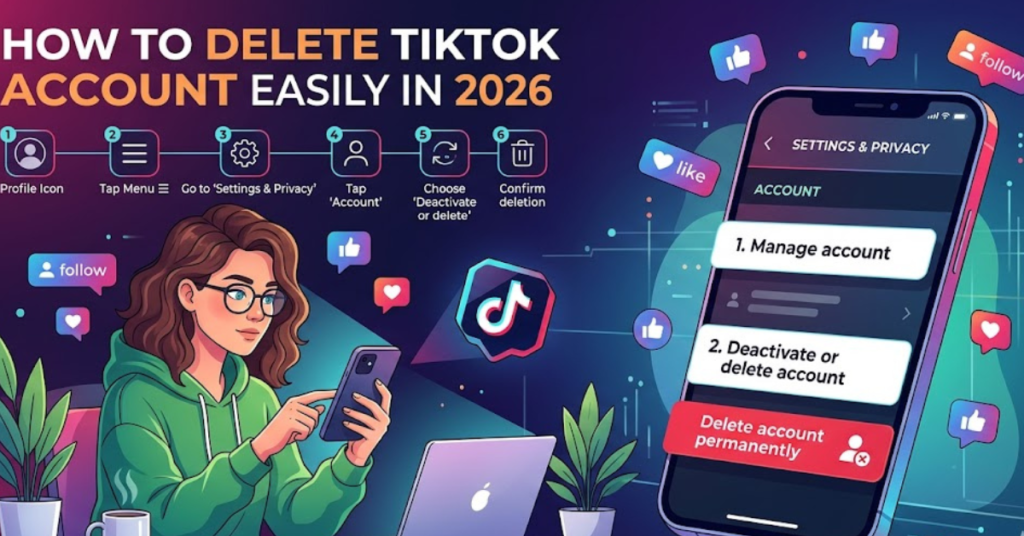
Step-by-Step Instructions
1. Open the TikTok App
Launch TikTok and log into the account you want to remove.
2. Go to Your Profile
Tap the Profile icon in the bottom-right corner.
3. Tap the Menu Icon
Select the three-line menu (☰) in the top-right corner.
4. Choose “Settings and Privacy”
This opens your account management options.
5. Tap “Account”
Inside settings, select Account.
6. Select “Deactivate or Delete Account”
TikTok will show both options.
7. Choose “Delete Account Permanently”
Follow the verification steps and confirm deletion.
That’s it—your account will be scheduled for deletion.
How to Delete TikTok Account on Desktop
Currently, TikTok’s desktop version has limited account management options. In most cases, permanent deletion must be completed through the mobile app.
However, you can:
- Access account settings online
- Download your TikTok data
- Contact support for login issues
For full deletion, the mobile app remains the recommended method.
How to Delete TikTok Account Without Password or Email
This is one of the most searched questions online: how to delete TikTok account without password or email.
Unfortunately, TikTok requires identity verification before allowing account deletion. This is done to protect users from unauthorized access.
Still, there are a few solutions.
Recover Your Password First
If you forgot your password, reset it before deleting your account.
Steps to Reset Password
- Open TikTok login page
- Tap Forgot Password
- Choose recovery via:
- Phone number
- Email address
- Follow verification instructions
- Create a new password
Once logged in, you can proceed with deletion.
No Access to Email? Use Phone Number
If your old email is inaccessible, TikTok often allows password recovery using your linked phone number.
This is the easiest alternative if your phone number is still active.
Simply choose Recover via Phone Number instead of email.
No Password and No Email Access? Contact TikTok Support
If you have neither password nor email access, your best option is TikTok Support.
What You’ll Need
TikTok may ask for:
- Username
- Linked phone number
- Previous email address
- Device details
- Proof of ownership
You can contact support through:
- TikTok Help Center
- In-app report problem section
- Feedback forms on TikTok’s website
This is the safest method for users searching for how to delete TikTok account without password or email.
How to Temporarily Deactivate TikTok Instead
Not sure if you want to leave forever? Temporary deactivation may be a better choice.
Deactivation hides your account without immediate permanent deletion.
Good Reasons to Deactivate Instead
- Social media detox
- Privacy concerns
- Short mental health break
- Exam or work focus
- Avoiding distractions
You can always return later without starting from scratch.
How to Download Your TikTok Data Before Deleting
Before deleting your account, consider downloading your data.
This may include:
- Video history
- Comment history
- Profile details
- Privacy settings
- Login history
Steps to Request Data
- Go to Settings and Privacy
- Tap Account
- Select Download Your Data
- Choose file format
- Submit request
TikTok usually processes this within a few days.
Common Reasons People Delete TikTok
People delete TikTok for many different reasons.
Some common ones include:
- Privacy and security concerns
- Screen time addiction
- Negative mental health effects
- Too many distractions
- Starting fresh with a new account
- Concerns about data sharing
Whatever your reason, deleting your account should be a personal and informed decision.
Important Things to Know Before Deleting
Before you hit delete, remember:
You May Lose:
- Saved drafts
- Followers and following list
- Direct messages
- Purchased coins or gifts
- Creator earnings (if applicable)
Always double-check before final confirmation.
FAQs
Can I recover my TikTok account after deleting it?
Yes—but only within 30 days. Simply log back in during the deactivation period to restore your account.
After 30 days, the account is permanently deleted.
Can I delete TikTok without logging in?
Usually, no. TikTok requires account verification before deletion.
If you can’t log in, you’ll need to recover access or contact TikTok support.
How do I delete TikTok account without password or email?
You’ll need to verify ownership through alternative methods like your phone number or TikTok Support.
Direct deletion without verification is not allowed for security reasons.
Does deleting TikTok remove all videos?
Yes. Once permanent deletion is completed, your profile, videos, and content are removed from the platform.
How long does TikTok take to delete an account?
TikTok starts with a 30-day deactivation period.
After those 30 days, permanent deletion is completed.
Can I make my TikTok private instead of deleting it?
Yes. You can switch to a private account in privacy settings if you prefer limited visibility instead of full deletion.
Conclusion
Learning how to delete TikTok account is simple once you know the right steps. Whether you’re permanently leaving the platform or just taking a short break, TikTok gives users flexible options to manage their accounts.
If you’re wondering how to delete TikTok account without password or email, recovery through phone verification or TikTok Support is usually the best solution.
Before deleting, remember to download your data and review what you may lose. Once the 30-day period ends, your account is gone for good.