
Losing an important text message can feel frustrating—especially when it contains a phone number, verification code, or meaningful conversation. The good news? Learning how to recover deleted text messages is often easier than you think.
Whether you’re using an iPhone, Android device, Samsung phone, or even trying to recover messages on Instagram, there are multiple ways to get them back. In this guide, we’ll walk through practical, step-by-step solutions that actually work, along with tips to improve your chances of recovery.
Can You Recover Deleted Text Messages?
Yes, in many cases you can recover deleted text messages. When messages are deleted, they’re not immediately erased from your device. Instead, the system marks that space as available for new data. This means:
- Recovery is possible if you act quickly
- Backups make recovery much easier
- Some methods don’t require third-party apps
- Cloud syncing can help restore messages
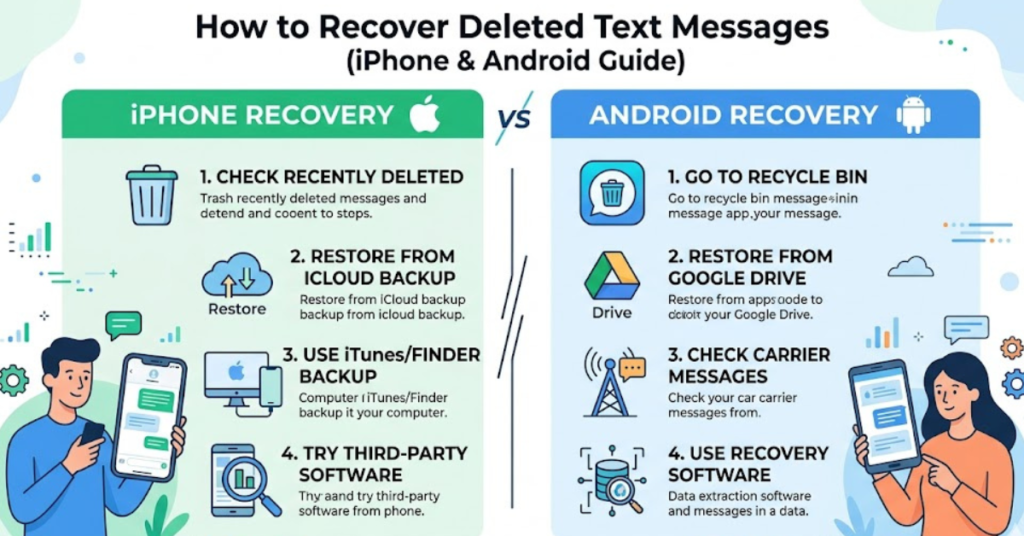
How to Recover Deleted Text Messages on iPhone
If you’re wondering how to recover deleted text messages on iPhone, Apple provides several built-in options.
Method 1: Recover from Recently Deleted (iOS 16 and Later)
Apple introduced a “Recently Deleted” folder for messages.
Steps:
- Open Messages
- Tap Edit (top-left)
- Select Show Recently Deleted
- Choose messages to recover
- Tap Recover
This is the easiest way to recover deleted text messages from iPhone without backups.
Method 2: Restore from iCloud Backup
If the messages aren’t in Recently Deleted:
- Go to Settings > General > Transfer or Reset iPhone
- Tap Erase All Content and Settings
- Set up your iPhone again
- Choose Restore from iCloud Backup
This replaces current data with backup data, so use carefully.
Method 3: Recover from iTunes/Finder Backup
Connect your iPhone to a computer and restore from an older backup. This method works well if you regularly sync your device.
How to Recover Deleted Text Messages on Android
Android users also have multiple recovery options. If you’re searching how to recover deleted text messages on android, try these approaches.
Method 1: Restore from Google Backup
Many Android devices automatically back up SMS.
Steps:
- Go to Settings
- Tap Google > Backup
- Check latest backup
- Reset phone and restore from backup
This is the safest way to recover deleted text messages android without installing extra apps.
Check Google Messages Archive
If you use Google Messages:
- Open Google Messages
- Tap Menu (three dots)
- Look for Archived
- Restore if found
This method helps when searching how to recover deleted text message on google messages.
How to Recover Deleted Text Message on Samsung
Samsung devices often include Samsung Cloud backups.
Using Samsung Cloud
- Go to Settings
- Tap Accounts and Backup
- Select Samsung Cloud
- Tap Restore Data
- Choose Messages
- Tap Restore
This is the fastest method for how to recover deleted text message on Samsung devices.
How to Recover Deleted Text Message from Android Without Backup
If you don’t have a backup:
- Use recovery software (desktop-based tools)
- Stop using your phone immediately
- Enable USB debugging
- Scan internal storage
Popular options include data recovery tools designed specifically for SMS restoration.
How to Recover Deleted Text Message on Instagram
Instagram messages (DMs) work differently from SMS.
Method 1: Download Instagram Data
- Go to Instagram Settings
- Tap Your Activity
- Select Download Your Information
- Request data
- Check downloaded file
You may find deleted conversations if they were stored previously.
Method 2: Check Linked Facebook Messages
If Instagram is linked to Facebook Messenger, some chats may still exist there.
Tips to Improve Your Recovery Chances
Act fast to increase success rate:
- Stop sending new messages immediately
- Avoid installing new apps
- Use backups first
- Check archived folders
- Enable automatic backups for future protection
Common Mistakes to Avoid
Resetting phone without backup
Installing random recovery apps
Overwriting storage
Ignoring cloud backups
FAQs About Recovering Deleted Text Messages
Can I recover deleted text message without backup?
Yes, but it’s harder. You may need recovery software or check archived folders.
How long do deleted message stay recoverable?
It depends on device usage. Once new data overwrites storage, recovery becomes difficult.
Can phone carriers recover deleted texts?
Sometimes. Some carriers store messages temporarily, but policies vary.
Are recovery apps safe?
Use trusted apps only. Avoid unknown tools that request excessive permissions.
Can I recover deleted messages on Instagram permanently?
Only if they exist in downloaded data or linked services.
Conclusion
Knowing how to recover deleted text messages can save you from losing important information. Whether you’re using an iPhone, Android, Samsung device, or trying to restore Instagram messages, the key is acting quickly and checking backups first.