
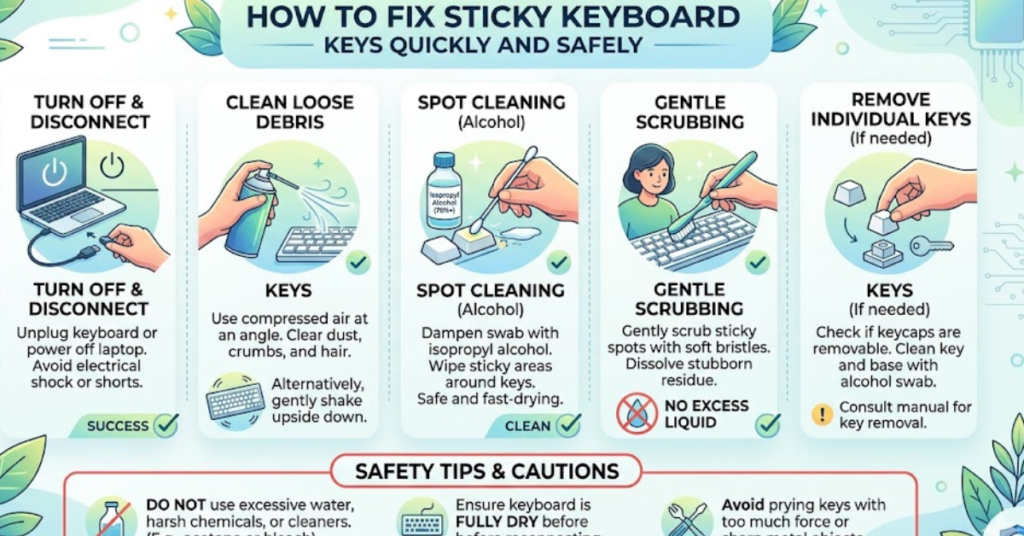

Few things are more frustrating than pressing a key and feeling it stick halfway down. Whether you’re typing an email, gaming, or working on a project, sticky keys can slow you down and lead to annoying typos. If you’re wondering how to fix sticky keyboard keys, the good news is that most issues can be solved quickly at home without professional repair.
In this guide, you’ll learn safe, effective methods to clean and restore your keyboard. We’ll cover everything from quick fixes to deeper cleaning techniques, plus prevention tips to keep your keys working smoothly.
Why Do Keyboard Keys Become Sticky?
Before you learn how to fix sticky keyboard keys, it helps to understand the cause. Common reasons include:
- Spilled drinks (coffee, soda, juice)
- Dust and debris buildup
- Food crumbs stuck under keys
- Worn-out key switches
- Residue from oils on fingers
Identifying the cause helps you choose the right solution.
Quick Fix: Try These First
Sometimes, you can fix sticky keys in seconds.
1. Turn Your Keyboard Upside Down
Gently shake your keyboard to remove loose debris.
Steps:
- Turn off your computer
- Flip the keyboard upside down
- Lightly tap the back
- Blow compressed air between keys
This often solves minor sticking issues.
How to Fix Sticky Keyboard Keys with Compressed Air
Compressed air is one of the safest cleaning methods.
What You Need
- Compressed air can
- Soft brush (optional)
Steps
- Turn off and unplug the keyboard
- Hold the keyboard at a slight angle
- Spray short bursts between keys
- Move across the entire keyboard
- Let debris fall out
Tip: Avoid long sprays to prevent moisture buildup.
Cleaning Sticky Keys with Isopropyl Alcohol
If residue is causing the problem, alcohol cleaning works best.
Supplies
- Isopropyl alcohol (70% or higher)
- Cotton swabs
- Microfiber cloth
Steps
- Power off the device
- Dip a cotton swab lightly in alcohol
- Gently clean around sticky keys
- Press the key repeatedly while cleaning
- Allow it to dry for 5–10 minutes
This method helps dissolve sugar and sticky substances.
Removing Keycaps for Deep Cleaning Mechanical Keyboards
For mechanical keyboards, removing keycaps provides better access.
How to Do It Safely
- Use a keycap puller
- Remove the sticky key carefully
- Clean underneath with alcohol
- Let everything dry completely
- Snap the keycap back into place
Avoid removing laptop keys unless you know the exact model—they can break easily.
How to Fix Sticky Laptop Keyboard Keys
Laptop keyboards require extra care.
Safe Cleaning Method
- Turn off and unplug
- Use compressed air at an angle
- Clean gently with alcohol-dampened swab
- Avoid excess liquid
Never pour liquid directly onto a laptop keyboard.
Natural Cleaning Alternative
If you don’t have alcohol, try:
- Slightly damp microfiber cloth
- Distilled water (very minimal)
- Gentle wiping around keys
Always dry immediately afterward.
Prevent Sticky Keys in the Future
Prevention saves time and money.
Best Practices
- Avoid eating over the keyboard
- Keep drinks away
- Clean weekly with compressed air
- Wash hands before typing
- Use a keyboard cover
These simple habits keep your keyboard smooth and responsive.
When You Should Replace the Keyboard
Sometimes cleaning isn’t enough.
Consider replacement if:
- Keys remain stuck after cleaning
- Switches feel physically damaged
- Liquid damage affected multiple keys
- Keys stop responding completely
Replacement may be more cost-effective in these cases.
FAQs
How do I fix sticky keyboard keys without removing them?
Use compressed air and clean around the edges with a cotton swab dipped in isopropyl alcohol. Press the key repeatedly to loosen debris.
Can I use water to clean sticky keys?
Yes, but only lightly dampened cloths. Avoid excess moisture and always dry immediately.
Why is only one key sticky?
Usually, a small crumb or drop of liquid is trapped under that specific key.
Is it safe to remove laptop keys?
It depends on the model. Many laptop keys break easily, so avoid removing them unless necessary.
Does compressed air really work?
Yes, it’s one of the safest and most effective ways to remove dust and debris.
Conclusion
Learning how to fix sticky keyboard keys doesn’t require technical skills—just the right approach. Start with simple methods like shaking and compressed air, then move to alcohol cleaning if needed. For deeper issues, removing keycaps (on supported keyboards) can restore full functionality.
Regular cleaning and prevention habits will keep your keyboard smooth, responsive, and frustration-free. If your keys still stick after trying these methods, it may be time to consider a replacement or professional repair.