
Thinking about leaving Telegram for good? Whether you’re switching to another messaging app, protecting your privacy, or simply taking a break from social media, knowing how to delete Telegram account properly is important.
Many users assume uninstalling the app is enough—but that’s not true. If you want to remove your chats, contacts, and account data completely, you need to follow the correct deletion process. In this guide, we’ll explain how to delete Telegram account permanently on Android, iPhone, and desktop, along with what happens after deletion and answers to the most common questions.
Let’s get started.
What Happens When You Delete Your Telegram Account?
Before learning how to delete Telegram account permanently on Android, it helps to understand the consequences.
When you delete your Telegram account:
- All your messages are deleted
- Your groups and channels remain, but ownership may transfer
- Your contacts can no longer message you
- Your saved media and cloud chats are removed
- Your account cannot be restored
This action is permanent, so make sure you really want to proceed.
How to Delete Telegram Account Permanently
There are two main ways to delete your Telegram account:
- Manual deletion through Telegram’s official deactivation page
- Automatic deletion after inactivity
Let’s explore both methods.
Method 1: How to Delete Telegram Account Manually
Step-by-Step Guide
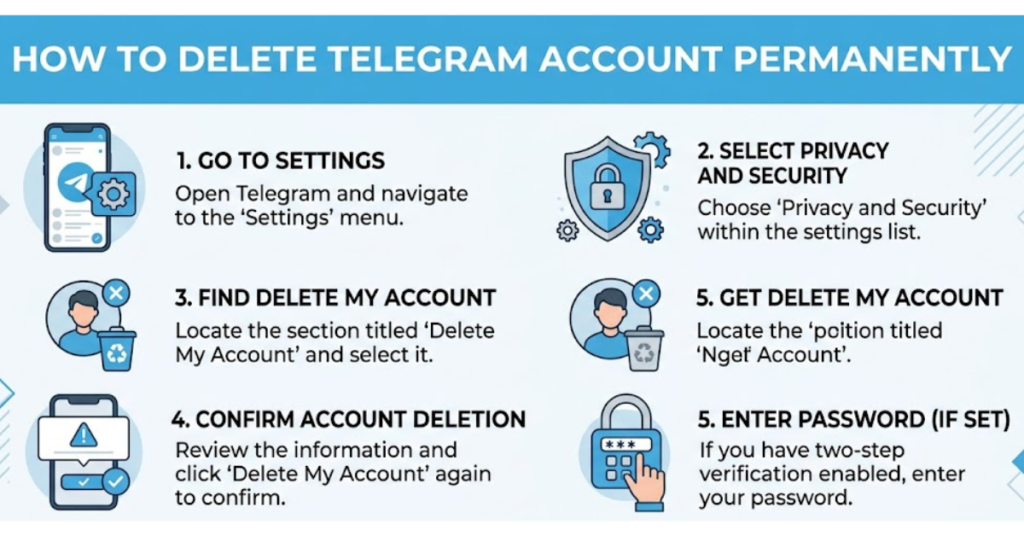
Telegram does not allow account deletion directly inside the mobile app. You must use a browser.
Step 1: Visit the Telegram Deactivation Page
Go to the official Telegram deactivation page:
This is the only safe and official way to delete your account manually.
Step 2: Enter Your Phone Number
Type the phone number linked to your Telegram account.
Important:
- Include your country code
- Use the same number registered with Telegram
Example:
+92XXXXXXXXXX
Then click Next.
Step 3: Check Telegram for Confirmation Code
Telegram will send a confirmation code inside the app—not via SMS.
Open Telegram and look for a message from Telegram containing your login code.
Step 4: Enter the Confirmation Code
Copy the code and paste it into the login page.
Click Sign In.
Step 5: Select “Delete Account”
After logging in:
- Click on Delete Account
- You may be asked why you’re leaving (optional)
Then confirm your choice.
Step 6: Confirm Permanent Deletion
Click Yes, Delete My Account
That’s it—your Telegram account is permanently removed.
How to Delete Telegram Account Permanently on Android
Many users specifically search for how to delete Telegram account permanently on Android, so here’s the simplest explanation.
Android Users Follow These Steps:
- Open Chrome or any browser
- Visit my.telegram.org/auth
- Enter your registered phone number
- Get the confirmation code from Telegram app
- Log in using the code
- Tap Delete Account
- Confirm permanent deletion
Since the Android app itself doesn’t include this option, browser access is required.
Method 2: Set Telegram Account to Self-Destruct
If you don’t want immediate deletion, Telegram offers automatic account deletion after inactivity.
How to Enable Auto-Delete
On Android or iPhone:
- Open Telegram
- Tap Settings
- Select Privacy and Security
- Scroll to Delete My Account If Away For
- Choose one of these options:
- 1 month
- 3 months
- 6 months
- 12 months
- 18 months
- 24 months
If you don’t log in during that period, Telegram automatically deletes your account.
This is useful if you’re taking a long break.
Can You Recover a Deleted Telegram Account?
No, once your Telegram account is deleted, recovery is not possible.
You can sign up again using the same phone number, but:
- Old chats are gone
- Groups and channels history is lost
- Contacts won’t be restored automatically
This is why you should think carefully before deleting.
Is Uninstalling Telegram the Same as Deleting It?
No, and this is a common misunderstanding.
Uninstalling Telegram:
- Removes the app from your phone
- Your account still exists
- People can still message you
Deleting Telegram Account:
- Permanently removes your profile
- Deletes chats and cloud data
- Stops all account activity
If privacy is your goal, deleting the account is the correct choice.
Safety Tips Before Deleting Telegram
Before proceeding, consider these quick tips:
Backup Important Information
Save:
- Photos
- Videos
- Important documents
- Contacts
- Private messages you may need later
Transfer Group Ownership
If you manage groups or channels, assign a new admin before deletion.
Otherwise, management may become difficult later.
Remove Connected Devices
For better privacy:
- Go to Settings
- Tap Devices
- Log out from all active sessions
This ensures your account is fully secure before deletion.
Common Reasons People Delete Telegram
Users choose to leave Telegram for many reasons:
- Privacy concerns
- Too many notifications
- Switching to WhatsApp or Signal
- Digital detox
- Unused account cleanup
- Security preferences
Whatever your reason, knowing how to delete Telegram account correctly helps avoid mistakes.
FAQs
How do I delete my Telegram account permanently?
Visit my.telegram.org/auth, log in with your phone number, receive the code in Telegram, and select Delete Account.
How to delete Telegram account permanently on Android?
Use your mobile browser to visit Telegram’s deactivation page. The Android app itself does not support direct account deletion.
Can I delete my Telegram account without logging in?
No, Telegram requires account verification through a login code sent to your app.
How long does Telegram take to delete an inactive account?
It depends on your settings. The default is often 6 months, but you can change it from 1 month to 24 months.
Will deleting Telegram delete secret chats?
Yes, secret chats and regular cloud chats are both permanently removed when you delete your account.
Can I create a new Telegram account after deletion?
Yes, you can register again using the same phone number, but your previous data will not return.
Conclusion
Now you know exactly how to delete Telegram account and how to delete Telegram account permanently on Android without confusion.
The most important thing to remember is this: uninstalling Telegram is not the same as deleting your account. If you want full removal of your data, you must use Telegram’s official deactivation page.
Take a few minutes to back up important chats, transfer group ownership, and log out of connected devices before proceeding. Once deleted, there’s no going back.
If you found this guide helpful, you may also want to explore related topics like securing your messaging apps, managing privacy settings, or comparing Telegram with other secure chat platforms.