
Ever needed to hide your phone number when making a call? Whether you’re protecting your privacy, contacting someone for business, or simply avoiding your number being saved, knowing how to call private can be extremely useful.
In this guide, you’ll learn how to call private on iPhone, Android, and any cell phone, plus tips on calling back a private number safely. We’ll keep things simple, practical, and easy to follow.
What Does “Calling Private” Mean?
Calling private means hiding your caller ID so the person you’re calling sees “Private Number,” “Unknown,” or “No Caller ID” instead of your phone number.
People often use this feature to:
- Protect personal privacy
- Make professional calls from a personal phone
- Avoid unwanted callbacks
- Contact businesses anonymously
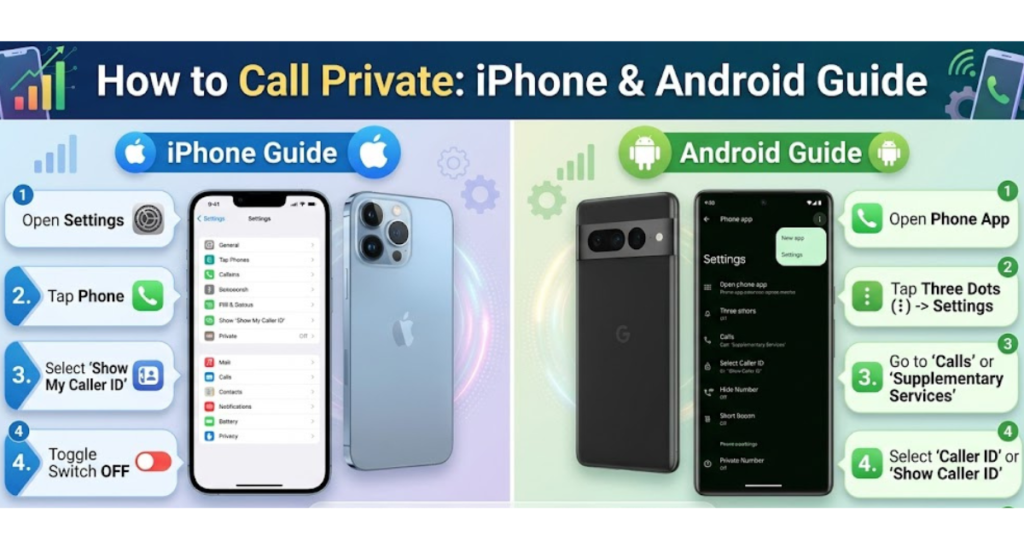
How to Call Private on iPhone
If you’re wondering how to call private on iPhone, there are two easy methods.
Method 1: Dial Code (Quickest Way)
- Open the Phone app
- Dial *67 before the number
- Example:
*67 123-456-7890 - Press call
Your number will appear as Private or No Caller ID.
Method 2: Hide Caller ID in Settings
- Go to Settings
- Tap Phone
- Select Show My Caller ID
- Toggle it Off
Now all outgoing calls will be private until you turn it back on.
How to Call Private on Android
The process varies slightly by manufacturer, but generally works like this:
Method 1: Use *67 Code
This is the simplest way to call private on Android:
- Dial *67 before the phone number
- Tap call
- Your number will be hidden
Method 2: Hide Caller ID in Settings
- Open Phone app
- Tap three dots (menu)
- Go to Settings
- Tap Caller ID
- Choose Hide Number
Now you can call private on cell phone automatically.
How to Call Private Number Back
Receiving calls from private numbers can be frustrating. Here are your options:
Option 1: Use *69 (Where Supported)
- Dial *69 immediately after the missed call
- It may call back the last incoming number
This doesn’t work in all regions or carriers.
Option 2: Contact Your Carrier
Your mobile provider may:
- Reveal private caller details (in certain cases)
- Offer call trace services
- Block anonymous callers
Option 3: Use Call-Blocking Apps
Apps like:
- Truecaller
- Hiya
- TrapCall
These can help identify or block private calls.
How to Call Private from iPhone Quick Recap
If you need a fast reminder:
- Dial *67 + number
- Or turn off Show My Caller ID in settings
- Works for one call or all calls
When Should You Use Private Calling?
Calling private can be useful in situations like:
- Selling items online
- Business outreach
- Protecting personal information
- Returning unknown calls safely
But avoid using it for suspicious or unethical purposes.
Important Tips Before Calling Private
- Some people won’t answer private calls
- Businesses may automatically block anonymous calls
- Emergency services still see your number
- Not all carriers support private calling
FAQs About How to Call Private
1. Does *67 work on all phones?
Yes, *67 works on most iPhones, Android phones, and landlines, but carrier support may vary.
2. How to call private on iPhone permanently?
Go to Settings > Phone > Show My Caller ID and turn it off.
3. Can I call a private number back?
You can try *69, contact your carrier, or use caller ID apps.
4. Is calling private legal?
Yes, calling private is legal in most places, as long as it’s not used for harassment or fraud.
5. Why does my private call still show my number?
Some carriers or apps override caller ID blocking.
6. How to call private on Android without code?
Use Phone App > Settings > Caller ID > Hide Number.
Conclusion
Learning how to call private gives you better control over your privacy and communication. Whether you use *67, adjust settings on your iPhone or Android, or explore carrier options, hiding your number is quick and simple.
Use this feature responsibly, and you’ll enjoy safer, more flexible calling. If you found this guide helpful, consider exploring more phone privacy tips to stay protected in everyday communication.