
Running out of space on your iPhone can be frustrating. You try to take a photo, download an app, or update iOS — and suddenly you see the dreaded “Storage Almost Full” notification. If you’re searching for how to buy more storage on iPhone, you’re not alone. Millions of users face this issue, especially with high-resolution photos, 4K videos, and large apps.
This guide explains how to buy more storage on iPhone, including the difference between iCloud storage and physical device storage. We’ll also cover how to buy more storage on iPhone not iCloud, plus practical alternatives if you don’t want to rely on cloud services.
Can You Actually Buy More Storage on iPhone?
Before diving into steps, it’s important to understand one key fact:
You cannot upgrade the internal storage of an iPhone after purchase.
Apple doesn’t allow physical storage upgrades.
However, you can buy more storage in two ways:
- Purchase iCloud storage (cloud-based)
- Use external storage solutions (not iCloud)
This is where many users get confused when searching how to buy more storage on iPhone not iCloud.
How to Buy More Storage on iPhone (Using iCloud)
The easiest and most official way to get more space is by upgrading your iCloud storage.
Step-by-Step Guide
- Open Settings
- Tap [Your Name] at the top
- Tap iCloud
- Select Manage Storage or iCloud Storage
- Tap Buy More Storage or Change Storage Plan
- Choose a plan:
- 50GB
- 200GB
- 2TB
- Tap Buy
- Confirm with Face ID, Touch ID, or Apple ID password
Your storage increases instantly.
iCloud Storage Pricing (Typical)
- 50GB — Low cost monthly
- 200GB — Best for families
- 2TB — Ideal for heavy users
How to Buy More Storage on iPhone Not iCloud
If you specifically want more storage without using iCloud, here are the best alternatives.
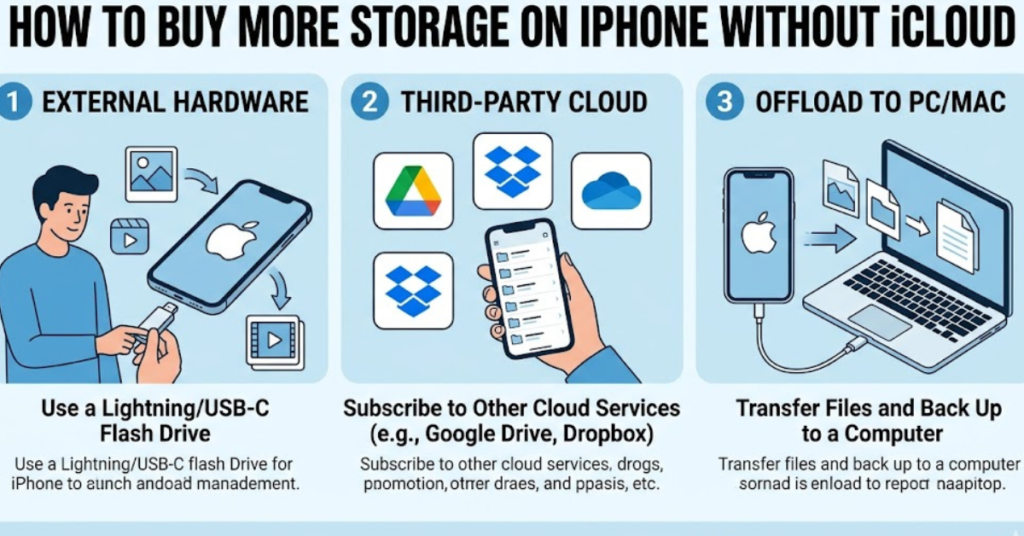
1. Use External Lightning or USB-C Flash Drive
External storage devices plug directly into your iPhone.
Popular options:
- SanDisk iXpand
- Kingston Bolt
- Samsung USB-C drives (for newer iPhones)
Benefits:
- No monthly subscription
- Works offline
- Great for photos and videos
Steps:
- Plug flash drive into iPhone
- Install companion app (App Store)
- Move files to external storage
- Delete originals from iPhone
2. Use External SSD (High Capacity Option)
If you record 4K video or store large files, an SSD is ideal.
Advantages:
- Huge storage (500GB–2TB)
- Fast transfer speeds
- Perfect for content creators
You’ll need:
- USB-C iPhone (iPhone 15 and newer)
- Compatible SSD drive
3. Use Wireless Storage Devices
Wireless storage connects via Wi-Fi.
Examples:
- WD My Passport Wireless
- SanDisk Connect Wireless Stick
How it works:
- Connect to device Wi-Fi
- Transfer files through app
- Free up iPhone storage
4. Use Third-Party Cloud (Not iCloud)
If you want cloud storage but not Apple’s service:
Alternatives:
- Google Drive
- Dropbox
- OneDrive
These still count as how to buy more storage on iPhone not iCloud because they are non-Apple options.
How to Check iPhone Storage Before Buying More
Always check what’s using space first.
Steps:
- Go to Settings
- Tap General
- Tap iPhone Storage
You’ll see:
- Apps using the most space
- Photos usage
- System data
- Recommendations
This helps you decide whether you actually need to buy more storage on iPhone or just clean up.
Quick Ways to Free Up Space Without Buying Storage
Try these first:
- Delete unused apps
- Remove duplicate photos
- Clear Safari cache
- Delete old videos
- Offload unused apps
- Clear Messages attachments
Sometimes you don’t need to buy storage at all.
Which Option Is Best?
| Option | Best For | Monthly Cost |
| iCloud Storage | Easy automatic backup | Yes |
| Flash Drive | Offline users | No |
| External SSD | Large video files | No |
| Google Drive | Cross-platform users | Yes |
| Wireless Storage | No cables | No |
FAQs
Can you buy internal storage on iPhone?
No. iPhone internal storage cannot be upgraded after purchase. You can only use cloud or external storage options.
Is buying iCloud storage the same as buying iPhone storage?
No. iCloud storage is cloud-based and does not increase the phone’s physical storage.
How to buy more storage on iPhone not iCloud?
Use external flash drives, SSDs, wireless storage devices, or third-party cloud services like Google Drive.
Does iCloud free up iPhone storage?
Yes. When enabled, iCloud Photos can store full-resolution photos in the cloud and keep smaller versions on your iPhone.
What is the cheapest way to get more storage?
Using an external flash drive is usually the cheapest one-time purchase.
Can Apple upgrade my iPhone storage?
No. Apple does not offer post-purchase storage upgrades.
Conclusion
Learning how to buy more storage on iPhone starts with understanding your options. While you can’t upgrade internal storage, you can easily expand space using iCloud, external drives, or third-party services. If you’re specifically searching how to buy more storage on iPhone not iCloud, external flash drives and SSDs are the best solutions.
Before spending money, check your current storage and remove unnecessary files. If you still need more room, choose the option that fits your budget and usage style.
Need more iPhone tips? Explore related guides on storage management, photo cleanup, and performance optimization to keep your device running smoothly.