
Posted a TikTok Story by mistake? Don’t worry—it happens to everyone. Whether you uploaded the wrong video, shared something too personal, or simply changed your mind, knowing how to delete TikTok story can save you stress in seconds.
TikTok Stories disappear automatically after 24 hours, but sometimes waiting that long isn’t ideal. The good news is that deleting a story is quick and easy, especially if you know exactly where to tap. In this guide, we’ll walk you through how to delete TikTok story on iPhone, Android, and answer the most common questions users have about TikTok Story management.
What Is a TikTok Story?
Before learning how to remove one, it helps to understand what TikTok Stories are.
TikTok Stories are temporary photo or video posts that stay visible for 24 hours. Unlike regular TikTok videos, they are designed for quick, casual sharing and disappear automatically.
People often use Stories for:
- Daily updates
- Behind-the-scenes content
- Quick announcements
- Fun moments that don’t need a permanent post
But because Stories are temporary and fast to post, mistakes can happen easily.
How to Delete TikTok Story
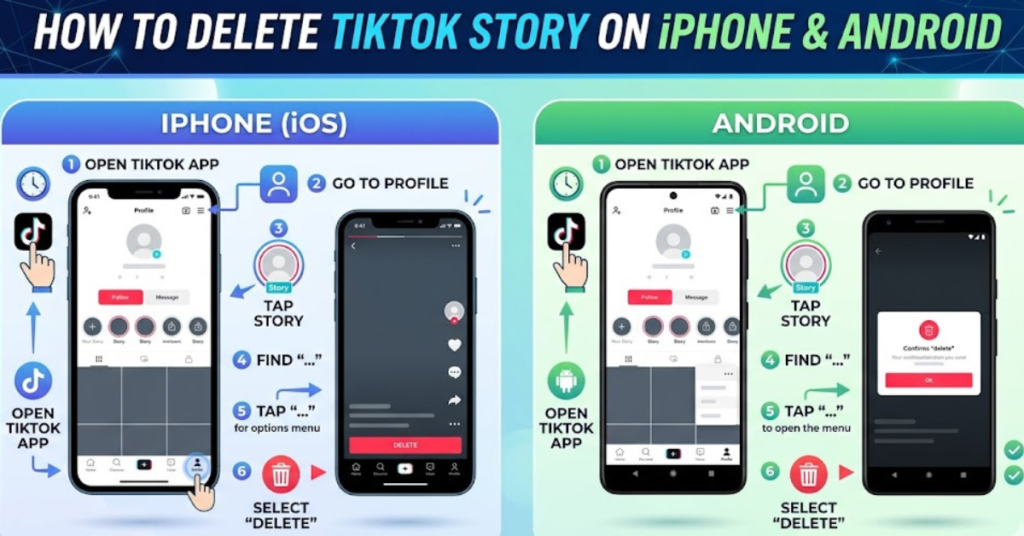
If you’re wondering how to delete TikTok story, follow these simple steps:
Step-by-Step Guide
1. Open the TikTok App
Launch TikTok on your smartphone and make sure you’re logged into the correct account.
2. Go to Your Profile
Tap the Profile icon located at the bottom-right corner of the screen.
3. Open Your Story
Look for your profile picture with the blue Story ring around it. Tap it to open your active TikTok Story.
4. Tap the Share or More Options Icon
While viewing the Story, tap the three dots (•••) or the share arrow, depending on your app version.
5. Select “Delete”
You’ll see several options. Tap Delete.
6. Confirm Deletion
TikTok will ask for confirmation. Tap Delete again to permanently remove the Story.
That’s it—your Story will disappear immediately.
How to Delete TikTok Story on iPhone
Many users specifically search for how to delete TikTok story on iPhone, but thankfully, the process is nearly identical to Android.
iPhone-Specific Steps
If you’re using an iPhone:
- Open TikTok
- Tap your profile picture
- Open the active Story
- Tap the More (•••) icon
- Choose Delete
- Confirm your action
Helpful iPhone Tip
Make sure your TikTok app is updated to the latest version from the App Store. Sometimes the delete option may look slightly different depending on the app version.
Can You Delete Someone Else’s TikTok Story?
No, you cannot delete another person’s TikTok Story unless you own the account.
However, you can:
- Report inappropriate content
- Block the user
- Mute their Stories
- Hide their content from your feed
Only the account owner has permission to delete their own Stories.
What Happens After You Delete a TikTok Story?
Once deleted:
- The Story disappears instantly
- Followers can no longer view it
- Replies and engagement may also disappear
- It cannot be restored in most cases
This is why it’s important to be sure before deleting.
Why Can’t I Delete My TikTok Story?
Sometimes users struggle with deleting Stories. Here are common reasons:
App Glitches
TikTok may temporarily lag or fail to load options.
Fix: Restart the app or your phone.
Outdated App Version
Older versions may have missing features.
Fix: Update TikTok from the App Store or Google Play Store.
Internet Connection Issues
A weak connection can prevent deletion from processing.
Fix: Switch to a stronger Wi-Fi or mobile network.
Story Already Expired
If the Story passed 24 hours, it may already be gone.
Tips Before Posting a TikTok Story
Deleting is easy, but prevention is better. Here are quick tips:
Double-Check Before Posting
Review your Story for:
- Wrong captions
- Accidental uploads
- Sensitive information
- Background details you may not want visible
Use Privacy Settings
TikTok allows you to control who sees your Stories.
You can limit visibility to:
- Everyone
- Friends
- Specific followers
Save Important Content Separately
Since Stories disappear after 24 hours, save valuable content before posting.
TikTok Story vs Regular TikTok Video
Here’s a quick comparison:
| Feature | TikTok Story | Regular Video |
| Duration | 24 hours | Permanent |
| Visibility | Temporary | Long-term |
| Best For | Quick updates | Main content |
| Editing Options | Limited | Advanced |
Understanding the difference helps you decide whether to post as a Story or a permanent video.
Frequently Asked Questions
FAQs About How to Delete TikTok Story
Can I delete a TikTok Story before 24 hours?
Yes, absolutely. You can delete it anytime before it expires naturally.
Is deleting a TikTok Story permanent?
Yes. Once deleted, it usually cannot be recovered.
How do I delete TikTok Story on iPhone if I don’t see the option?
Update your TikTok app first. If the problem continues, log out and back in again.
Can followers still see my Story after I delete it?
No. Once deleted, it disappears immediately for everyone.
Does deleting a Story delete comments or replies too?
In most cases, yes. Interactions connected to that Story are removed as well.
Can I recover a deleted TikTok Story?
Usually no. Deleted Stories are typically removed permanently.
Conclusion
Learning how to delete TikTok story is an essential skill for anyone using the platform regularly. Whether you posted something by mistake or simply changed your mind, TikTok makes the process simple and fast.
If you’re specifically searching for how to delete TikTok story on iPhone, the steps are just as easy and only take a few taps. The key is acting quickly before the Story gains too much visibility.
Take a moment to review your privacy settings, keep your app updated, and post confidently knowing you’re always in control of your content. If you found this guide helpful, you may also want to explore tips for managing TikTok privacy settings and improving your profile security.